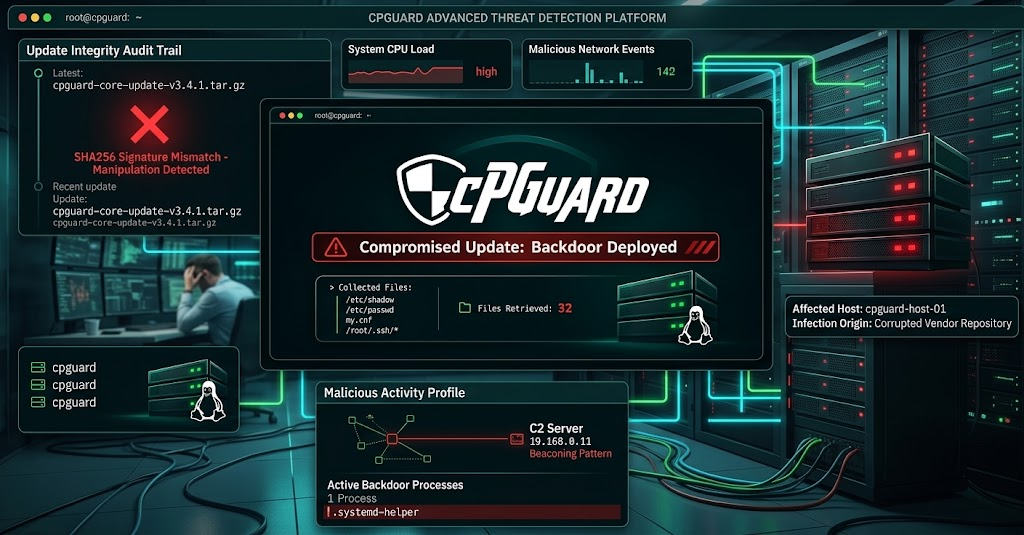
cPGuard Update Channel Compromised to Distribute Backdoor to Linux Servers
An attack on OPSSHIELD's distribution infrastructure allowed a malicious script to be injected into cPGuard updates. The operation harvested password hashes, database configurations, and SSH files from Linux servers. The manufacturer confirms that data from 32 servers was exfiltrated by the attacker.
OPSSHIELD, developer of the cPGuard security solution, published a security alert on November 3, 2026, reporting the compromise of its update distribution infrastructure.
The incident occurred on November 2, when an attacker used compromised credentials to access the environment responsible for distributing product updates.
From this access, it was possible to insert a malicious script into the legitimate update channel of cPGuard, a tool used to protect Linux servers and hosting environments.
The case represents a Software Supply Chain Attack: instead of compromising each server individually, the criminals abused the trust established between the vendor and its customers.
According to OPSSHIELD, the script was distributed in versions 5.88.12 through 5.88.19. The company identified the incident in less than 12 hours and stopped the malicious distribution.
What happened
On November 2, 2026, at 02:06 UTC, an unidentified attacker used compromised credentials to gain unauthorized access to OPSSHIELD's update distribution infrastructure.
The access allowed the publication of a malicious script through cPGuard's legitimate update mechanism.
The issue is particularly relevant because security tool updates typically receive a high level of trust and can execute privileged operations on the operating system.
OPSSHIELD confirmed that:
The affected versions are 5.88.12 through 5.88.19.
The malicious script collected sensitive files from the servers.
The data was sent to OPSSHIELD's own licensing server.
The attacker managed to retrieve part of the information stored in that environment.
The preliminary investigation identified 32 retrieved files, each associated with a customer server.
The company highlights that the 32 files represent a preliminary estimate of the data confirmed to have been retrieved by the attacker, not the total number of potentially affected servers.
OPSSHIELD
Technical analysis
Distribution of malicious code
The attack exploited the compromise of credentials used to manage the distribution infrastructure.
Instead of relying on a specific vulnerability in Linux or cPanel, the criminals used the product's own update mechanism to distribute the malicious code.
This means that servers that received and executed the compromised update could execute the script with the privileges available to the cPGuard process.
Collection of sensitive information
According to OPSSHIELD's investigation, the script accessed files important to the security and administration of the servers:
File | Exposed information |
|---|---|
| Local user password hashes |
| Local account information |
| MariaDB/MySQL configurations and potential credentials |
Root history | Recorded commands and potential secrets |
| Authorized public keys |
| Known SSH hosts history |
The collection of these files represents a significant risk.
Although /etc/shadow stores hashes instead of plaintext passwords, these hashes can be subjected to offline recovery attempts, especially when passwords are weak, reused, or have been previously exposed.
Additionally, database configuration files and command histories can store secrets that do not have the same hashing protection.
Backdoor installation and data preparation
OPSSHIELD identified the following artifacts related to the execution of the script:
Malicious script:
cpguard-v58812-i91511.shBackdoor:
/var/tmp/.cpg91511_shCollection directory:
/var/tmp/.cpg91511Compressed file:
/var/tmp/.cpg91511/loot.tgz
The hidden directory was used to store the collected data prior to its transfer.
The corrective update removes known files, but the absence of these artifacts after the update does not prove that the script was never executed.
Data exfiltration
Another important aspect is that the data was not sent directly to an external server controlled by the attacker.
According to OPSSHIELD, the script sent the information to the company's own licensing server using a compromised account.
Subsequently, the attacker retrieved the files from that environment.
This strategy leveraged the vendor's legitimate infrastructure as an intermediary for collecting and exfiltrating information.
The company preliminarily confirmed the retrieval of 32 files by the attacker.
Affected systems and versions
Immediate action required
Component | Status |
|---|---|
cPGuard 5.88.12 | Affected |
cPGuard 5.88.13 | Affected |
cPGuard 5.88.14 | Affected |
cPGuard 5.88.15 | Affected |
cPGuard 5.88.16 | Affected |
cPGuard 5.88.17 | Affected |
cPGuard 5.88.18 | Affected |
cPGuard 5.88.19 | Affected |
cPGuard 5.88.25 or higher | Fix released |
The incident involves environments running cPGuard, including hosting servers with cPanel/WHM, DirectAdmin, Plesk, and standalone installations.
CVE/CVSS: No CVE has been assigned to this incident, nor is there an official CVSS score. The issue is related to the compromise of the vendor's update infrastructure, not a specific Linux kernel vulnerability.
Indicators of Compromise (IoCs)
OPSSHIELD released the following indicators:
Indicator | Identification |
|---|---|
Malicious script |
|
Backdoor |
|
Hidden directory |
|
Collected file |
|
These indicators can be used in forensic investigations and Threat Hunting activities.
Important: the corrective update removes the known files. Therefore, a scan performed after the update may not find the artifacts, even if the server was previously compromised.
How to check if the server received a compromised version
OPSSHIELD has provided a procedure to check the update history.
Run the following on the server terminal:
Check the update history:
grep 'Successfully updated' /opt/cpguard/logs/install_logLook for logs containing versions between:
5.88.12
5.88.13
5.88.14
5.88.15
5.88.16
5.88.17
5.88.18
5.88.19
If any of these versions appear, the server must be treated as potentially compromised.
The presence of an affected version in the history confirms that it was installed, but does not independently prove that the script was executed or that data was transferred.
Likewise, the absence of matching logs does not guarantee that the environment is secure, especially when the history is incomplete.
Remediation and containment recommendations
OPSSHIELD has released a corrective update and recommends its immediate installation on all servers using cPGuard.
Step 1 — Update cPGuard
cpgcli update --startStep 2 — Confirm the installed version
cpgcli --versionThe output should indicate version 5.88.25 or higher.
Step 3 — Rotate credentials
If the script was executed or may have been executed, the recommendation is:
Reset root passwords and all local accounts enabled for password authentication, using a trusted recovery environment.
Change passwords reused on other systems.
Rotate MariaDB/MySQL credentials.
Replace S3 access keys.
Revoke and generate new DigitalOcean tokens.
Review secrets recorded in the root command history.
Replace SSH private keys stored in
/root/.ssh.Remove the respective old public keys from systems that still trust them.
Step 4 — Review support access
OPSSHIELD also announced a preventive update to remove its support access keys from servers where they had been previously added.
This measure is complementary and does not replace the corrective update nor the rotation of potentially exposed credentials.
Regarding server reinstallation: OPSSHIELD does not currently recommend fully rebuilding all systems as a standard procedure. This assessment is provisional and depends on the evolution of the investigation. If there are other signs of compromise or if the integrity of the environment cannot be proven, a rebuild may be necessary.
MITRE ATT&CK
Based on the documented behaviors, the following indicative technical mappings can be established:
Technique | Identifier | Behavior |
|---|---|---|
Supply Chain Compromise | T1195.002 | Distribution of malicious code via update |
Valid Accounts | T1078 | Use of compromised credentials |
Unix Shell | T1059.004 | Execution of commands in Linux |
Local System Data | T1005 | Collection of local files |
| T1003.008 | Access to authentication information |
Credentials from Password Stores | T1552.003 | Collection of potential secrets from shell history |
Local Staging | T1074.001 | Staging of collected data |
Archive via Utility | T1560.001 | Compression of information |
Analytical mapping based on disclosed behaviors; does not represent an official classification published by OPSSHIELD.
Impacts for businesses and hosting providers
The incident deserves special attention from companies managing Linux environments, especially hosting providers, MSPs, and teams responsible for multiple client servers.
The compromise of a security tool can trigger a chain reaction.
Risks include:
Exposure of administrative credentials.
Compromise of databases.
Unauthorized SSH access.
Abuse of private keys.
Compromise of other servers that trust the exposed keys.
Access to cloud storage services.
Persistence of unauthorized access even after updating the product.
For companies managing multiple environments, the investigation should not be limited to the server that triggered the first alert. It is necessary to identify all hosts that received the compromised versions.
CyberX Analysis
The incident involving cPGuard presents one of the most delicate situations in infrastructure security: when the very tool responsible for protecting the server becomes used as a compromise mechanism.
The problem highlights an important limitation of traditional defense models. Even when an organization uses a firewall, antivirus, monitoring, and a specific Linux protection solution, excessive trust in update mechanisms can open the door to large-scale attacks.
There are three points that deserve special attention.
1. Updates must also be considered part of the attack surface.
A legitimate update can possess elevated privileges and access to extremely sensitive files. Therefore, vendor security and distribution infrastructure must be part of the risk assessment.
2. A compromised server can represent several others.
The theft of SSH keys and administrative credentials can turn an initially limited incident into an opportunity for lateral movement within corporate environments.
This is especially relevant for MSPs that use shared credentials or maintain trust relationships between different clients.
3. Updating does not necessarily mean being secure.
Installing the patched version removes known artifacts, but it does not automatically invalidate credentials that have already been copied.
For this reason, recovery requires updating, investigation, secret rotation, and access validation.
In CyberX's assessment, companies using security solutions with administrative privileges should adopt additional controls over the update chain, including change monitoring, access segmentation, version inventory, and periodic credential reviews.
Conclusion
The compromise of the cPGuard update channel demonstrates that the trust placed in software vendors must also be accompanied by technical controls and validation processes.
The incident does not merely represent a flaw in a security tool. It highlights how the compromise of a centralized distribution infrastructure can impact multiple corporate environments simultaneously.
The priority for administrators is to identify potentially affected installations, apply the corrective version, rotate credentials, and investigate potential unauthorized access.
In critical environments, server integrity must be proven by evidence, not assumed merely because the update was completed.
Frequently Asked Questions
What caused the cPGuard compromise?
An attacker used compromised credentials to access OPSSHIELD's update distribution environment and insert a malicious script into the legitimate channel.
Which cPGuard versions were affected?
The versions affected by the incident were from 5.88.12 to 5.88.19.
What data was collected by the malicious script?
The script collected sensitive files such as /etc/shadow, /etc/passwd, my.cnf, root history, authorized_hosts, and known_hosts keys.
How can administrators check if the server was affected?
By running a grep command on the installation history to search for logs containing versions 5.88.12 to 5.88.19.
What is the security recommendation after applying the corrective update?
The recommendation includes updating to version 5.88.25 or higher, rotating credentials for root, local accounts, MariaDB/MySQL, S3 keys, tokens, and SSH private keys.